Delivery Feedback
Out-of-the-box, Hopp excels in managing and iterating the transformation, keeping track of issues in the data and transformation rules via structured events.
As long as the data is being processed inside Hopp, everything that happens to it is visible and traceable.
But once the transformed data leaves Hopp and is delivered to the target system, that visibility typically stops. At that point, Hopp no longer knows whether the data was accepted, partially rejected, or failed validation in the target system.
Make no mistake, a core quality of Hopp is a strong, iterative process ensuring that - when go-live approaches - Hopp has all the validations in place to ensure that no problematic data reaches target delivery.
But that is only true at the final stages of the project. Until the project gets to this point, there will be issues in the data delivered to the target system during the test iterations of the migration.
Delivery Feedback addresses this gap by allowing feedback from the target delivery - both errors and confirmations -
to be fed back into Hopp and shown as Events on the affected Business Objects, right alongside the events that Hopp itself emits.
This feedback appears directly in the Hopp Portal:
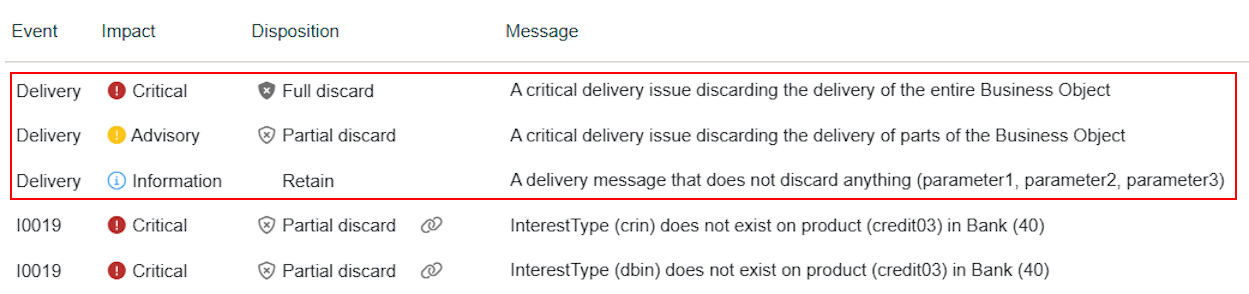
The Delivery Feedback extension
True to form, the delivery feedback in Hopp is an extension point. That means that Hopp is open for custom implementations of delivery feedback to meet specific requirements for any migration project.
We provide a default implementation of a Target Feedback Provider that can read the target feedback from a CSV file that adheres to a specific format. In many cases, this default provider is enough to handle the needs of a project.
So, let's first have a look at that default provider and then later in this article line up the actual Feedback Provider Extension interface contract that enables a fully customized implementation.
Using the default CSV Target Feedback Provider
As all extensions, any target feedback provider must be explicitly used by a given track. As always, this is done from the Operations/Administration/Extension Usage panel for the track:

Choose the Delivery Feedback extension type from the drop down:

Now you can add the usage of the default Csv Feedback provider (or any other target feedback
provider that is available) and provide the values for the parameters it requires:
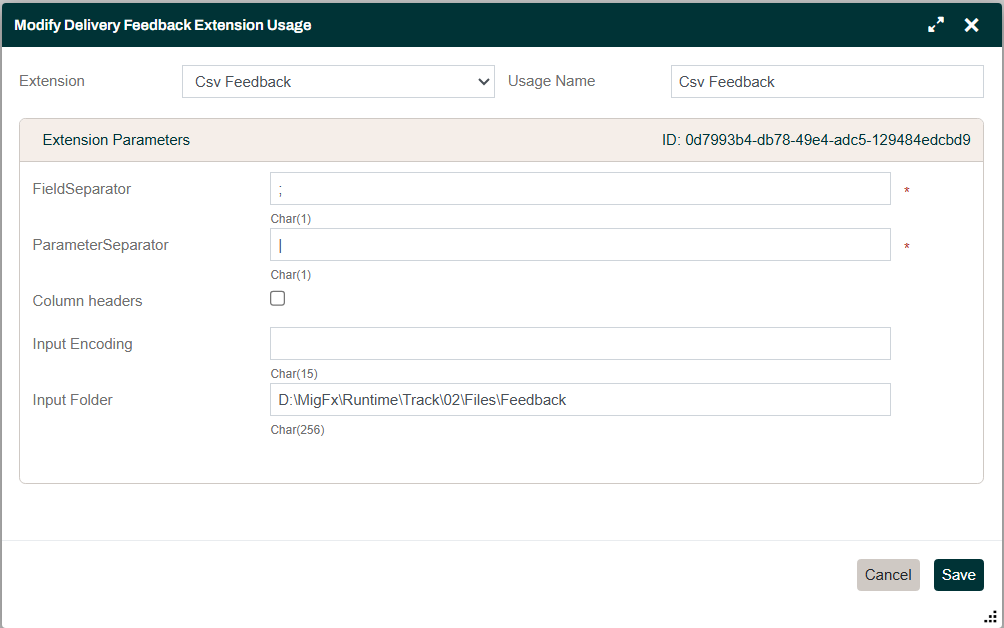
The parameters for the default Csv Feedback provider are
- FieldSeparator
- The character used to separate fields in the csv file
- ParameterSeparator
- The last field in a line in the csv file can be a list of parameters to associate with the issue reported by the line.
This parameter is the character used to separate the parameters in the list
(must be different from the
FieldSeparator) - Column Headers
- Check here if the first line in the file contains column headers
- Input Encoding
- Specify the input encoding for the CSV file or leave blank to use the encoding set in the options for the track
- Input Folder
- The folder where the csv files are read from
Launching the job to read the target feedback
Once a Target Feedback provider has been configured, a job to load the feedback can be launched from the Operations/Administration/Manage panel:
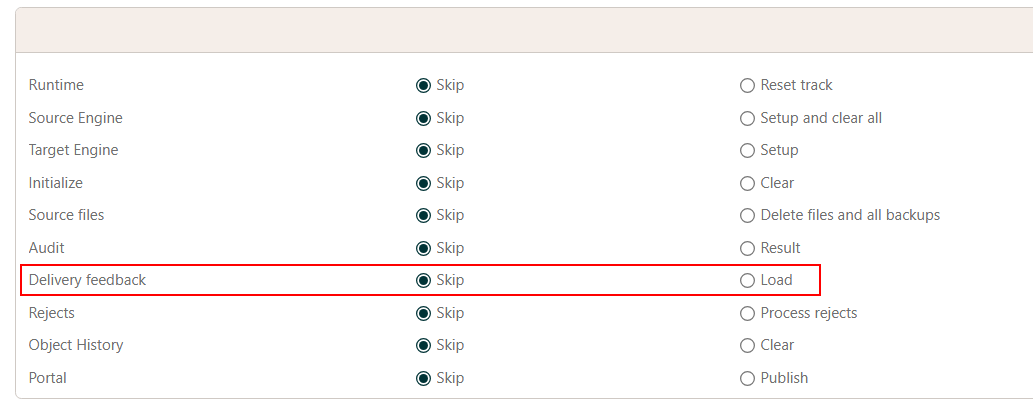
Processing of Csv files
Each line in a Csv file reports the result of the target delivery that is related to a specific Business
Object instance in Hopp. A Business Object instance is identified by a numeric ItemId.
A Csv file can contain multiple lines for a given ItemId.
A line for an ItemId can report an issue for that item, and such lines will become Events in the Hopp Portal.
A line may also report that the item was delivered with no issues.
A line in the Csv file that reports that the item was delivered with no issues will clear any previous delivery events the Hopp Portal may have stored for this item.
It is important to always provide feedback for all items in a delivery, including those that don't have issues.
Otherwise, you risk leaving behind delivery events that are no longer occurring.
You can place multiple Csv files in the Input Folder.
However, if feedback for the same ItemId appears in multiple files, only the feedback from the newest file will be used for that ItemId.
If the Input Folder does not exist or contains no files when the job runs, the job fails with an error.
When the Csv feedback provider is running, it will read and process all the files in the Input Folder
and then move them to a timestamped subfolder under Processed (named Processed/yyyy-MM-dd-HHmmss/)
so they will not be processed again.
The Csv file format
The fields separated by FieldSeparator in the Csv file are:
ItemId;Action;Message;Disposition;Impact;Parameters
| ItemId | This is the common reference that ties the line in the Csv file to the correct Business Object instance in the Hopp Portal |
| Action |
|
| Message | The message to show as an Event in the Hopp Portal for this issue |
| Disposition |
|
| Impact |
|
| Parameters | A list of values separated by |
Write Message as a constant description of the class of issue and put the per-item
details in Parameters. The Portal shows the full detail either way.
Hopp identifies an event template by the Message text plus the number of Parameters.
Issues with the same Message and the same number of Parameters share one template -
they share one row in the Events list, where the count on that row reflects how many times
the issue occurred.
Embedding variable data (Business Object identifiers, dates, field names, values) directly
in the Message defeats this - every variation creates a different event template. Each
new variation adds noise to the Events list, making it harder to navigate and use.
For the same reason, use a consistent number of Parameters per Message: varying the
count creates additional templates even when the message text matches.
Some samples
To clear feedback for item (all 3 are valid):
123456
234567;
345678;clear
To record feedback for item:
123456;record;A critical delivery issue discarding the delivery of the entire Business Object;DiscardRoot;Critical
123456;record;An advisory delivery issue discarding the delivery of parts of the Business Object;DiscardChild;Advisory;
123456;record;A delivery message with 3 parameters that does not discard anything;Retain;Information;parameter1|parameter2|parameter3
Keeping Message stable and using Parameters for the per-item detail - instead of:
123456;record;Customer John Smith (ID: 12345) has invalid date 2026-99-99 in field BIRTH_DATE;DiscardRoot;Critical
234567;record;Customer Jane Doe (ID: 67890) has invalid date 2026-99-99 in field BIRTH_DATE;DiscardRoot;Critical
write:
123456;record;Customer has invalid date in date field;DiscardRoot;Critical;John Smith|12345|2026-99-99|BIRTH_DATE
234567;record;Customer has invalid date in date field;DiscardRoot;Critical;Jane Doe|67890|2026-99-99|BIRTH_DATE
Both lines map to a single event template; the per-row detail lives in the parameters.
When the Target System returns feedback with data already woven into the text (for example, a
single sentence with values embedded inline), splitting those values out into separate
Parameters may not be worth the effort.
In that case, use a short category as the Message and put the full Target System
response into a single Parameter. The category groups similar issues into one template,
while the parameter preserves the original feedback on each event.
For example, when the Target System returns:
Customer 12345 (John Smith): Date of birth 2026-99-99 in field BIRTH_DATE is invalid - month value 99 out of range
a suggested feedback record is:
123456;record;Invalid date;DiscardRoot;Critical;Customer 12345 (John Smith): Date of birth 2026-99-99 in field BIRTH_DATE is invalid - month value 99 out of range
Implementing a Target Feedback Provider
Implementing a target feedback provider follows the same pattern as other extension points of the Hopp Runtime:
- Derive from an abstract base class provided in the public Hopp libraries (from NuGet or installed locally)
- Decorate the derived class with the
Extensionattribute to give it a name in the Hopp Portal - Ask for parameters with properties decorated with the
ExtensionParameterattribute - Implement the required abstract members defined by the abstract base class
Let's illustrate this by inspecting the default Csv feedback provider
Inspecting the default Csv Feedback provider
using MigFx.Director.Server.Feedback;
using MigFx.Director.Server.Feedback.Target;

// The Extension attribute names this extension in the Hopp Portal
[Extension("Csv Feedback")]
// Deriving from the TargetFeedbackProvider base class provided in the public Hopp Libraries
internal class TargetFeedbackProviderCsv(ITargetFeedbackContext context) : TargetFeedbackProvider(context)
{
    // This is the abstract method to override to do whatever needed
    // to return an enumeration of IFeedbackItem to the Hopp Runtime
    public override IEnumerable<IFeedbackItem> GetFeedback()
    {
        // This is where the default Csv feedback provider reads and processes
        // the Csv files and moves them to the Processed sub-folder
    }

    #region Parameters

    [ExtensionParameter(Length = 1, NotBlank = true, DefaultValue = ";", Hint = "The character delimiter separating field values")]
    public string FieldSeparator { get; set; } = ";";

    [ExtensionParameter(Length = 1, NotBlank = true, DefaultValue = "|", Hint = "The character delimiter separating the values in the Parameters field")]
    public string ParameterSeparator { get; set; } = "|";

    [ExtensionParameter(DataType = MigDataTypeCode.Boolean, Label = "Column headers", Hint = "Do input files contain a column header row?")]
    public bool ColumnHeaders { get; set; }

    [ExtensionParameter(Length = 15, Label = "Input Encoding", Hint = "Leave blank to use track encoding as set in options", Nulls = true)]
    public string InputEncoding { get; set; }

    [ExtensionParameter(Length = 256, Label = "Input Folder", Hint = "The folder where target feedback files are placed ", Nulls = true)]
    public string InputFolder { get; set; }

    #endregion
}
That is really all there is to it.
Public interfaces
There are 3 interfaces in the overall contract for the feedback provider:
ITargetFeedbackContextIFeedbackItemIFeedbackMessage
The ITargetFeedbackContext is passed to the constructor of the feedback provider and contains a helper method that can be used to get
the ItemId in exchange for the key that identifies the Business Object in the Hopp Runtime:
namespace MigFx.Director.Server.Feedback
{
    /// <summary>
    /// Represents a feedback context that provides access to job context and helper methods.
    /// </summary>
    public interface ITargetFeedbackContext : IJobContext
    {
        /// <summary>
        /// Gets the unique identifier for an item based on its type (Business Object name) and key fields.
        /// </summary>
        /// <param name="itemType">The (Business Object name) of the item.</param>
        /// <param name="keyFields">The collection of key-value pairs representing the key fields that identify the item.</param>
        /// <returns>The unique identifier for the item.</returns>
        long GetItemId(string itemType, IEnumerable<KeyValuePair<string, string>> keyFields);
    }
}
In most projects, the target system identifies a Business Object by its natural key (the customer
number, the order ID, or similar), not by Hopp's internal ItemId. A custom provider that receives
feedback under natural keys uses GetItemId to resolve them: pass the Business Object's name as
itemType and the key/value pairs of the natural key as keyFields, and Hopp returns the numeric
ItemId for use in IFeedbackItem.ItemId. The default Csv provider sidesteps this because the Csv
file already carries the numeric ItemId on each line.
The IFeedbackItem interface contains the properties Hopp requires for all feedback on a single item.
Feedback items must be delivered in ascending order of Timestamp. When multiple lines share the same ItemId,
the newest wins. An older timestamp following a newer one for the same ItemId raises InvalidOperationException.
namespace MigFx.Director.Server.Feedback
{
    /// <summary>
    /// Represents a feedback item containing a collection of messages for a single Business Object.
    /// </summary>
    public interface IFeedbackItem
    {
        /// <summary>
        /// Gets the timestamp for this feedback. Feedback must be in ascending timestamp order. In case multiple
        /// feedbacks are received for same ItemId, the newest feedback wins. If feedback for the same ItemId
        /// is encountered again with an older timestamp an <see cref="InvalidOperationException"/> is thrown.
        /// </summary>
        DateTime Timestamp { get; }

        /// <summary>
        /// Gets the ItemId that references these messages back to a specific Business Object in Hopp
        /// </summary>
        long ItemId { get; }

        /// <summary>
        /// Gets the collection of feedback messages associated with this item.
        /// </summary>
        IEnumerable<IFeedbackMessage> Messages { get; }
    }
}
The IFeedbackMessage contains the properties for a single message for an item.
namespace MigFx.Director.Server.Feedback
{
    /// <summary>
    /// Represents a feedback message containing information for a Hopp event.
    /// </summary>
    public interface IFeedbackMessage
    {
        /// <summary>
        /// Gets the message text describing the event.
        /// </summary>
        string Message { get; }

        /// <summary>
        /// Gets the disposition indicating how the Business Object was handled
        /// </summary>
        EventDisposition Disposition { get; }

        /// <summary>
        /// Gets the impact of the event
        /// </summary>
        EventImpact Impact { get; }

        /// <summary>
        /// Gets the collection of parameters associated with the event.
        /// </summary>
        IEnumerable<string> Parameters { get; }
    }
}
Integrating a custom Target Feedback Provider into the Hopp Runtime is quite straightforward.
The extension interface is clean and minimal, requiring only that you return feedback items with their associated messages.