Migration Audit
Overview
In almost all data migrations, there is a business requirement for Reconciliation. In general terms, this term covers a mechanism (preferably automated) to verify that the data from the legacy source system was migrated in accordance with requirements.
This is a large topic, and the purpose of this article is not to cover it in depth. The purpose is rather to place the Hopp software in the broader context of Reconciliation and to explain the rationales behind and the limitations of what Hopp provides.
While everybody agrees on the broader concept of reconciliation, it is more difficult to pin down once you get a bit more into the details.
In broad terms, reconciliation covers:
- That all in-scope data in the legacy source system is either migrated or discarded in accordance with requirements
Easily stated, but what does this actually mean? In conceptual terms, Reconciliation means to reconcile expected results and actual results.
In some migrations, it is enough to count stuff: "We had x invoices in the legacy source system, y invoices were discarded by the migration as required, z invoices were delivered to the target system. If x minus y equals z everything is ok". For this kind of simple counting, the Hopp Portal is often quite enough to satisfy reconciliation requirements
But in many migrations, this simple approach doesn't cut it. And then suddenly things become much more complicated and for a generic migration tool like Hopp, it becomes impossible to provide a generic reconciliation. The truth is that more advanced reconciliation actually means is completely dependent on what is actually being migrated.
In addition, the more transformations that are taking place in the migration, the more reconciliation is getting complicated. Given that Hopp is built for complex data migration, extensive transformations is simply a fact of life in any Hopp driven data migration.
Hopp exposes interfaces to inspect the migrated data and collect Audit data that represents the Actual Result of the migration. By implementing these interfaces, a migration project can collect the Audit Data from each Business Object as it is migrated and hand back the collected audit data to the Hopp Runtime. The Hopp Runtime will store the Audit data next to the Business Object and take care of all the annoying housekeeping when Business Objects are re-iterated and new Audit data collected.
In addition to the Audit Collect interfaces, Hopp also exposes an Audit Result interface. This is called when an operator initiates an Audit Result job from the Portal Operations interface and will receive all the collected Audit data for all Business Objects.
In this way, Hopp delivers a safe and open mechanism to collect the Audit data representing the Actual Results side of the Reconciliation equation. It is up to the migration project to establish a reconciliation of the Audit data with the Expected Results from outside Hopp.
Audit Collect Interface
The Hopp Runtime will call the Audit Collect interface twice during the migration of a Business Object:
-
After the Source Engine has exported the Business Object, the Audit Collect interface is called with
- The source data that was extracted from the Staging database for the Business Object
- The interface data that was produced by the Source Engine to be sent to the Target Engine
-
After the Target Engine has imported a Business Objects, the Audit Collect interface is called with
- The interface data received from the Source Engine
- The target data that was produced by the Target Engine
The Runtime will call the interface with Xml Documents representing the migrated data. While it is of course possible to implement the interface directly and thus receive the Xml Documents and expect the data using XPath strings to navigate the migrated data, this is not the recommended practice.
Instead, both the Source Engine generator and the Target Engine generator provide intermediate, abstract implementations of the interface in the generated Source- and Target Engines. The great benefit of this approach is that the generated Source- and Target Engines already contains generated Parsers that can be used inspect the migrated data in a strongly named and strongly typed manner.
As a consequence, the recommended practice is to implement your own Audit Collection by deriving from these generated, abstract implementations. In this way, you no longer have to write 'magic strings' in order to inspect the migrated data in an Xml Document. Instead, you are provided with a very straight forward way of simply overriding methods and receive the strongly typed parsers for the migrated data.
This flow is illustrated in the figure below.
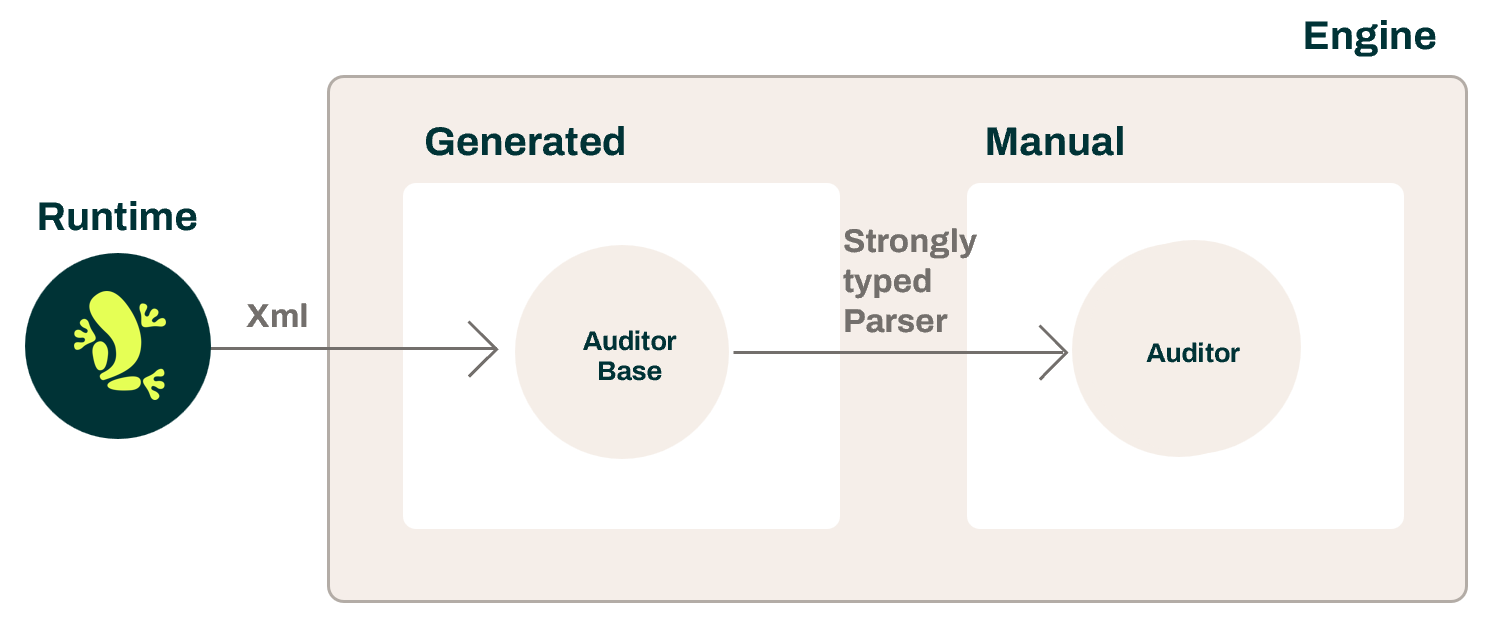
Let's have a look at how this looks in practice. Since the collection of Audit data is slightly simpler in for the Target Engine, we'll start with that one and deal with audit collection from the Source Engine afterwards.
Target Auditor
When the Runtime receives the Business Object result from the Target Engine, the Runtime will call the Target Auditor (if it exists). As mentioned above, the generated Target Engine contains an abstract implementation of the Target Auditor that you can use.
Public Target Auditor interface
First, this is the abstract base class that is exposed by the Runtime:
public abstract class Auditor : ExtensionBase<IAuditorContext>
{
  public abstract XElement Collect(bool discarded, string businessEntity, XmlElement interfaceXml, XmlElement targetXml);
}
So, the Runtime calls the Collect method every time a Root Business Object has been processed by the Target Engine. It passes these parameters:
- discarded
- True if the root Business Object has been discarded
- businessEntity
- The name of the Root Business Entity
- interfaceXml
- An XmlElement containing the interface data received from the Source Engine for the Business Entity
- targetXml
- An XmlElement containing the target data produced by the Target Engine for the Business Entity
Again, this is the way the Runtime calls out to the Auditor passing the 2 XmlElements for the interface- and target data. While it is certainly possible to implement this directly and navigate the xml with magic strings, we recommend you instead make use of the class that is generated for you in the Target Engine.
Generated Target Auditor base class
This is the generated, abstract AuditorBase class for a Target Engine that can migrate Customer and Account root Business Entities:
public abstract class AuditorBase : MigFx.Director.Server.Import.Audit.Auditor
{
  public override XElement Collect(bool discarded, string businessEntity, XmlElement interfaceXml, XmlElement targetXml)
  {
    var interfaceItem = InterfaceItem.Parse(interfaceXml);
    var targetItem = TargetItem.Parse(targetXml);

    return businessEntity switch
    {
      "Account" => Account(discarded, interfaceItem.As().Account.Parse(), targetItem?.As().Account.Parse()),
      "Customer" => Customer(discarded, interfaceItem.As().Customer.Parse(), targetItem?.As().Customer.Parse()),
      _ => throw new ApplicationException($"Unknown BusinessEntityName passed to Audit collector: {businessEntity}")
    }; }

    public virtual XElement Account(bool discarded, Parsers.Interface.IAccountParserProvider.IParser interfaceItem, Parsers.Target.IAccountParserProvider.IEditable.IParser targetItem) => null;
    public virtual XElement Customer(bool discarded, Parsers.Interface.ICustomerParserProvider.IParser interfaceItem, Parsers.Target.ICustomerParserProvider.IEditable.IParser targetItem) => null;
}
As you can see, the generated AuditorBase implements the Collect from the abstract interface method and receives the 2 XmlElements from the Runtime.
However, the generated AuditorBase class then maps the incoming Collect call from the Runtime to a generated, virtual method for each root Business Entity, in this case Customer and Account.
The good thing is, that when it calls, for instance, the generated method for Account, it also parses the interface- and target xml so the generated, virtual method for Account receives a strongly typed, generated parser it can use to inspect both the interface- and the target data for an Account in a strongly named and strongly typed fashion.
In short, the generated AuditorBase bridges the gap between the XmlElements received via the interface shared between the engine and the Runtime and the strongly typed, generated Parsers known only in the generated Target Engine.
Note that the generated AuditorBase is abstract. This means that the Runtime will not discover it and use it for Audit collection. For this to happen, you must create your own Auditor that derives from the AuditorBase.
The actual Target Auditor
Here's a very basic, sample implementation of a Target Auditor that only implements audit collection for Account by overriding the virtual Account method:
[Extension("Demo Auditor")]
internal class Auditor : AuditorBase
{
  public override XElement Account( bool discarded, Parsers.Interface.IAccountParserProvider.IParser interfaceItem, Parsers.Target.IAccountParserProvider.IEditable.IParser targetItem )
  {
    return new XElement("Account",
      new XElement("balance", interfaceItem.Fields.Balance),
      new XElement("productCode", interfaceItem.Fields.ProductCode)
      );
  }
}
Note that in the end, the Auditor is an extension to the Hopp Runtime just like Reformatters, Unloaders etc. As such, you can
- Decorate it with an Extension attribute to decide how the extension should be named in the Extension Usage panel in the Portal Operations
- Provide parameter properties to enable parameterization of the extension in the Extension Usage panel in the Portal Operations
The Auditor can use the interface and target parsers it received as parameters to inspect the migrated data. In the very simple sample above, the Target Auditor returns an Xml element containing the ProductCode and the Balance interface fields of the Account. It uses the strongly typed interface item parser to retrieve the values.
Since it has not overridden the Customer virtual method of the generated base class, it does not implement any audit data collection for the Business Object Customer,
The Auditor returns an XElement that the Runtime will receive and store next to the migrated root Business Entity. Or null if no data should be stored. In the example above, the Auditor creates an xml element with the audit data it wishes to store and returns is back to the Hopp Runtime.
Important: Mark the Target Engine for discovery
In order for your Target Engine to be enumerated by the Runtime extension discovery process, it is vital that the assembly has been decorated with the MigDirectorExtension attribute. This is done by adding the attribute to an ItemGroup element in the TargetEngine.csproj file:
<ItemGroup>
  <AssemblyAttribute Include="MigFx.Director.MigDirectorExtension" />
</ItemGroup>
Source Auditor
The Source Auditor flow is similar to the Target Auditor. The Runtime call a generic interface with the extracted source data and the interface data produced by the Source Engine as Xml documents. And the Source Engine generator creates a generated base class that implements the generic interface and call virtual methods with the strongly typed parsers.
However, given the ability to copy a Business Object in the Source Map in Studio in order to define different extraction maps for the same Business Object (read more about this Business Object Copies in the Source Map) there is an extra layer in the implementation to allow for the fact that there can be different extraction maps - and thus different source data parsers - for the same Business Entity.
As an example, let's assume that the Business Object Account has been copied in the Source Map so there is the original, unnamed copy as well as a copy the has been named Loan:

When looking at the extraction map for Account [Loan], the root object in the Extraction Map has been named AccountAsLoan:

In this case, the Runtime will call the Source Auditor when it receives the exported Business Entity from the Source Engine. The Runtime calls the public Source Auditor interface.
Public Source Auditor interface
The Runtime calls the Collect method every time a Root Business Object has been processed by the Source Engine.
[ExtensionType(ExtensionType.SourceAuditor)]
public abstract class Auditor : ExtensionBase<IAuditorContext>
{
  public abstract XElement Collect(bool discarded, string businessEntity, string name, XmlElement sourceXml, XmlElement interfaceXml);
}
The Runtime passes these parameters:
- discarded
- True if the root Business Object has been discarded
- businessEntity
- The name of the Root Business Entity as it is named in the Target Map
- name
- The name given to the Business Entity in the Source Map (Loan in the sample above). Null, if the Business Entity is not named in the Source Map
- sourceXml
- An XmlElement containing the source data extracted by the Source Engine from the Staging database for the Business Entity
- interfaceXml
- An XmlElement containing the interface data produced by the Source Engine to be sent on to the Target Engine
Generated Source Auditor base class
This is the generated, abstract AuditorBase class for a Source Engine that can migrate Customer and Account root Business Entities. Given that the Account Business Entity in our sample has been copied, it is slightly more evolved than its Target cousin:
public abstract class AuditorBase : MigFx.Director.Server.Export.Audit.Auditor
{
  public override XElement Collect(bool discarded, string businessEntity, string name, XmlElement sourceXml, XmlElement interfaceXml)
  {
    var sourceItem = SourceItem.Parse(sourceXml);
    var interfaceItem = InterfaceItem.Parse(interfaceXml);

    switch (businessEntity)
    {
      case "Account":
      {
        var interfaceParser = interfaceItem.As().Account.Parse();

        return (name ?? "Unnamed") switch
        {
          "Unnamed" => Account(discarded, sourceItem.As().Account.Unnamed.Parse(), interfaceParser),
          "Loan" => Account(discarded, sourceItem.As().Account.Loan.Parse(), interfaceParser),
          _ => throw new ApplicationException($"Unknown Name passed to the Account Audit collector: {name}")
        };
      }
      case "Customer":
      {
        var interfaceParser = interfaceItem.As().Customer.Parse();

        return (name ?? "Unnamed") switch
        {
          "Unnamed" => Customer(discarded, sourceItem.As().Customer.Unnamed.Parse(), interfaceParser),
          _ => throw new ApplicationException($"Unknown Name passed to the Customer Audit collector: {name}")
        };
      }
      default: throw new ApplicationException($"Unknown BusinessEntityName passed to Audit collector: {businessEntity}");
    }
  }

  public virtual XElement Account(bool discarded, Parsers.Source.IAccountParserProvider.IUnnamed.IParser sourceItem, Parsers.Interface.IAccountParserProvider.IParser interfaceItem) => null;
  public virtual XElement Account(bool discarded, Parsers.Source.IAccountParserProvider.ILoan.IParser sourceItem, Parsers.Interface.IAccountParserProvider.IParser interfaceItem) => null;
  public virtual XElement Customer(bool discarded, Parsers.Source.ICustomerParserProvider.IUnnamed.IParser sourceItem, Parsers.Interface.ICustomerParserProvider.IParser interfaceItem) => null;
}
Again, the generated AuditorBase implements the Collect from the abstract interface method and receives the 2 XmlElements from the Runtime and maps to generated, virtual methods that are called with the generated, strongly typed parsers for the source- and interface data.
The difference is that the generated base class contains 2 different virtual method overloads for the Account Business Entity, one overload accepts the typed source Item for Unnamed Account and the other overload accepts the typed source item for the Account named Loan.
The actual Source Auditor
Here's a very basic, sample implementation of a Source Auditor that only implements audit collection for both copies of Account by overriding the virtual Account method overloads. Since is does not override the default overload for the Customer, no Audit data is collected for the Customer Business Entity.
[Extension("Demo Auditor")]
public class Auditor : AuditorBase
{
  // Audit Unnamed Account
  public override XElement Account(bool discarded, Parsers.Source.IAccountParserProvider.IUnnamed.IParser sourceItem, Parsers.Interface.IAccountParserProvider.IParser interfaceItem)
 {
  return new XElement("Audit",
    new XAttribute("type", "normal"),
    new XElement("balance", sourceItem.ExtractionMap.Account().Fields.Balance),
    new XElement("ProductType", sourceItem.ExtractionMap.Account().Fields.ProductType)
    );
 }

 // Audit Loan Account
 public override XElement Account(bool discarded, Parsers.Source.IAccountParserProvider.ILoan.IParser sourceItem, Parsers.Interface.IAccountParserProvider.IParser interfaceItem)
 {
  return new XElement("Audit",
    new XAttribute("type", "loan"),
    new XElement("balance", sourceItem.ExtractionMap.AccountAsLoan().Fields.Balance),
    new XElement("ProductType", sourceItem.ExtractionMap.AccountAsLoan().Fields.ProductType)
    );
 }
}
In both overridden Account methods, the Auditor collects the ProductType and the Balance from the sourceItem = the data that was extracted from the Staging database for the Account.
The difference between the 2 overrides is that the first one deals with the extraction map of the unnamed Account and the second one deals with the extraction map of the Loan Account.
Important: Mark the Source Engine for discovery
In order for your Source Engine to be enumerated by the Runtime extension discovery process, it is vital that the assembly has been decorated with the MigDirectorExtension attribute. This is done by adding the attribute to an ItemGroup element in the SourceEngineCustom.csproj file:
<ItemGroup>
  <AssemblyAttribute Include="MigFx.Director.MigDirectorExtension" />
</ItemGroup>
Conclusion
The Runtime and the generated engine code work in unison to make it easy to implement Source- and Target Auditors and have them called by the Runtime when the engines have processed each Business Entity.
Implement your Auditors by overriding the relevant virtual methods in a class deriving from the generated AuditorBase in each engine.
When you override a method in your Auditor for a specific Business Entity, the generated infrastructure will pass the migration data to that method strongly typed parsers allowing you to inspect the migrated data in a name- and type safe manner.
Your auditor then returns a string representation of the collected audit data to the Runtime. The Runtime will then store audit data next to the Business Entity and handle all housekeeping of the audit data in connection to reiteration of the same Business Entity.
So, this is the collection of audit data. But that is of course only half the story. In the next article we will explore how you can get the audit data out of the Runtime to serve your reconciliation infrastructure.
Audit Result Interface
The previous section went through how to implement an Auditor to collect audit data from the results of either the Source Engine or the Target Engine when it has processes a Business Entity. These auditors hand back the collected audit data to the Runtime that will store it next to the Business Entity itself. The Runtime will take care of all the necessary housekeeping to keep things consistent - even when the migration of the Business Entities are iterated as a natural part of the migration progress.
So far so good. This article deals with how to get the audit data unloaded from the Runtime so it can take part in your overall reconciliation.
The Audit unload is initiated on request from the Administration / Manage panel in the Portal Operations:
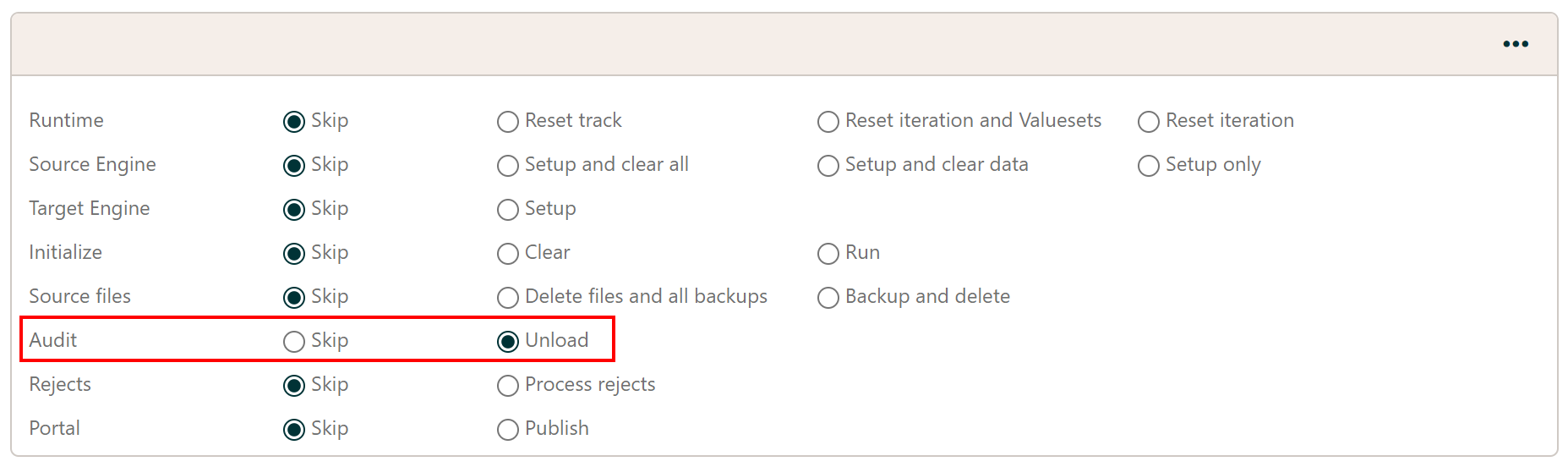
When an Audit Unload job is submitted, it will retrieve the collected audit data for all Business Entities and hand the data to an extension class that derives from the public abstract interface class AuditResult
[ExtensionType(ExtensionType.AuditResult)]
public abstract class AuditResult : ExtensionBase<IAuditResultContext>
{
  public abstract void Enumerate(IEnumerable<IAuditResultItem> items);
}
When implementing an AuditResult extension class, you must override the abstract Enumerate method. This method receives an IEnumerable
of IAuditResultItem, one for each Business Entity:
public interface IAuditResultItem
{
  long ItemId { get; }
  Guid EntityID { get; }
  string Name { get; }
  Guid BusinessEntityID { get; }
  string BusinessEntityName { get; }
  string PartitionValue { get; }
  string SourceKey { get; }
  string MigrationKey { get; }
  bool ExportSucceeded { get; }
  bool ImportSucceeded { get; }
  XElement SourceAuditData { get; }
  XElement TargetAuditData { get; }
}
- ItemId
- The numeric id of the Business Entity instance in the Hopp migration
- EntityID
- The Guid of the Business Entity in the Source Map
- Name
- The name of the Business Entity in the Source Map - or null if the entity was not named
- BusinessEntityID
- The Guid of the Business Entity in the Target Map
- BusinessEntityName
- The name of the Business Entity in the Target Map
- PartitionValue
- The PartitionValue this Business Entity instance belongs to
- SourceKey
- The source key of the Business Entity instance. This is the Discriminator fields of the extraction map
- MigrationKey
- The migration key of the Business Entity instance. This is the Interface Fields marked as keys in the Target Map
- ExportSucceeded
- False if the Source Engine discarded the instance
- ImportSucceeded
- False if the Target Engine discarded the instance
- SourceAuditData
- The xml data returned by the Source Auditor for the instance - or null if no data returned
- TargetAuditData
- The xml data returned by the Target Auditor for the instance - or null if no data returned